TCP/IP Reference Model Explained
TCP/IP Reference Model
The TCP/IP reference model came from a very practical need. The U.S. Department of Defense wanted a network that would keep working even under extreme conditions. The idea was simple but tough to achieve. No matter what happens, data should still move from one place to another. At that time, networks used different communication media. Some used copper wires, some used optical fiber, others relied on microwave links or satellites. The challenge was to design a system that works across all of them without breaking. That’s how TCP/IP was born. Another important thing made it successful. It was an open standard. Anyone could use it. That allowed rapid adoption, and over time, it became the foundation of the modern Internet.
The TCP/IP model is divided into four layers. Each layer has a specific role, and together they handle the entire communication process.

- Application layer
- Transport layer
- Internet layer
- Network access layer
A. Network Access Layer
This is where everything starts physically. If data cannot move through cables or wireless signals, nothing else matters. This layer defines how bits are transmitted over the medium. That includes electrical signals in copper cables, light pulses in optical fiber, and radio waves in wireless networks. It also handles how devices access the shared medium. Protocols like Ethernet dominate this layer today. Ethernet uses CSMA/CD to control access. A device first listens. If the channel is free, it sends data. If two devices send at the same time, a collision occurs and both retry after a delay. This layer also handles hardware addressing through MAC addresses. Unlike IP addresses, which can change, MAC addresses are fixed to the device. This helps identify devices within a local network. Error detection also begins here. Frames include checks like CRC to detect corruption during transmission. However, this layer does not fix errors. It only detects them.
In simple terms, this layer is about getting raw data onto the network and receiving it correctly from the physical medium.
B. Internet Layer
Once data is on the network, it needs direction. That’s the job of the Internet layer. This layer handles logical addressing using IP addresses. Every device on the Internet has a unique IP address, which allows routers to identify where data should go. Routing is the core function here. Routers examine the destination IP and decide the best path. They may forward packets through multiple intermediate networks before reaching the final destination. This layer also deals with packet fragmentation. Different networks support different maximum sizes. If a packet is too large, it gets broken into smaller pieces and reassembled later. Protocols in this layer include IP, ICMP, and ARP. IP handles addressing and routing. ICMP is used for error reporting and diagnostics, like when you use ping. ARP maps IP addresses to MAC addresses inside a local network. The Protocol Data Unit here is called a packet.
You can think of this layer as the navigation system. It decides where data goes and how it gets there.
C. Transport Layer
Now comes reliability. Sending data is not enough. It must arrive correctly, in order, and without loss. That’s where the transport layer comes in. This layer provides end to end communication between devices. It ensures that data sent from one application reaches the correct application on another device. It uses port numbers to identify processes. For example, web traffic usually uses port 80 or 443. This allows multiple applications to run simultaneously on the same device.

Two main protocols operate here. TCP and UDP.
- TCP is connection oriented. It establishes a connection before sending data. It guarantees delivery, maintains order, and retransmits lost packets. It also handles flow control and congestion control to avoid overwhelming the network.
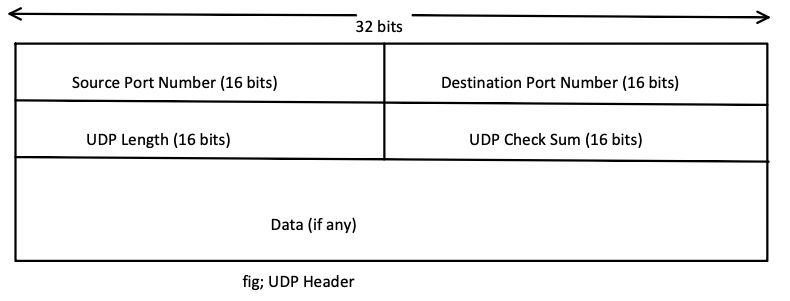
- UDP is connectionless. It sends data without setting up a connection. It is faster but does not guarantee delivery. This makes it useful for real time applications like streaming or gaming.

Error detection and recovery are handled here. If data is lost or corrupted, TCP ensures it is resent. The Protocol Data Unit at this layer is called a segment. In simple terms, this layer makes sure communication between two devices is reliable and efficient.
D. Application Layer
This is the layer you interact with directly, even if you don’t realize it. It provides network services to applications. When you open a website, send an email, or transfer a file, you are using protocols from this layer. Some common protocols include DNS, HTTP, HTTPS, FTP, SMTP, DHCP, SNMP, and Telnet. Each one serves a different purpose. DNS resolves domain names. HTTP loads web pages. SMTP sends emails. DHCP assigns IP addresses automatically. This layer also defines how data should be formatted and presented. It ensures that the receiving application understands the data correctly. Unlike the OSI model, the TCP/IP application layer combines multiple functions. It includes what OSI separates into application, presentation, and session layers. That means tasks like data formatting, encryption, and session management can also happen here. The Protocol Data Unit at this layer is simply called data.

In simple terms, this layer connects users and applications to the network. It turns user actions into network communication.
How All Layers Work Together
- When you access a website, the process moves through all layers.
- Your request starts at the application layer. The transport layer breaks it into segments and ensures reliable delivery. The internet layer assigns addresses and chooses the path. The network access layer sends it physically over the network.
- At the destination, the process reverses. Each layer unwraps its part until the data reaches the application.
- This layered approach keeps things simple and organized. Each layer focuses on one job, and together they make the Internet work smoothly.